Custom Pixelization Shader
A downloadable game
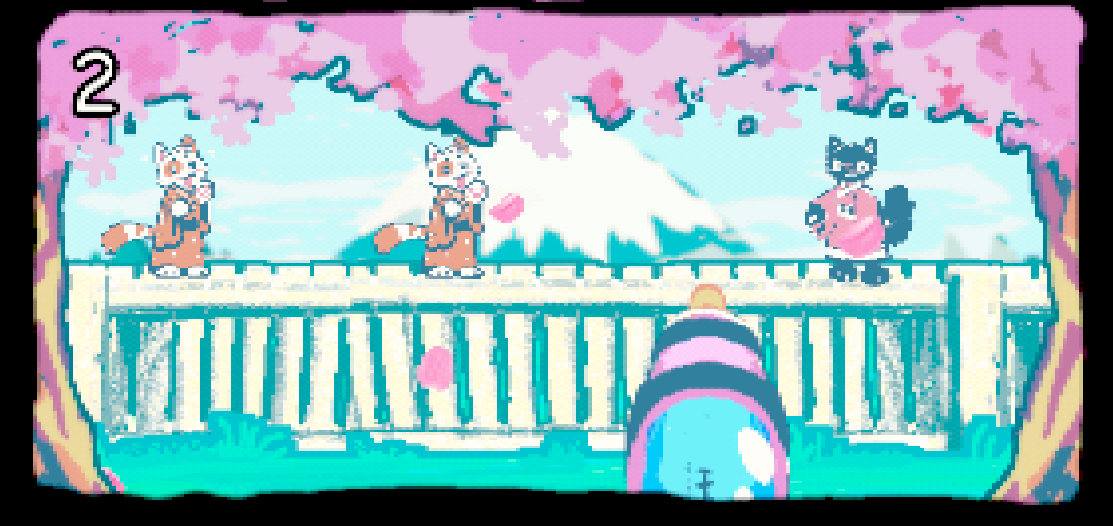
This is a free post-processing shader for Unity’s Universal Render Pipeline, designed to give your game the look of a classic handheld display.
The shader includes three display modes inspired by the:
- Original Game Boy
- Game Boy Color
- Game Boy Advance
This is a small community resource that I made for my own projects and decided to share in case anyone else finds it useful.
Features
- Three handheld-inspired display modes
- Adjustable virtual resolution
- Adjustable simulated pixel size
- Configurable dithering
- Contrast and saturation controls
- Game Boy Advance brightness and colour-depth settings
- Simple Full Screen Pass setup
- Suitable for both 2D and 3D games using URP
The effect combines pixelation, colour quantisation, dithering and colour adjustments to create a stylised retro handheld appearance.
It is intended as an artistic effect rather than a completely accurate recreation of the original hardware.
Requirements
- Unity
- Universal Render Pipeline
- A Unity version that supports the Full Screen Pass Renderer Feature
This shader does not support Unity’s Built-in Render Pipeline.
Installation
- Import the shader into your Unity project.
- Create a new material.
- Set the material’s shader to:
GameBoy/GameBoyAdvancePostProcess
- Find the active URP Renderer asset in your project. For a 2D project, this will commonly be a Renderer 2D asset.
- Select Add Renderer Feature.
- Add a Full Screen Pass Renderer Feature.
- Assign the shader material to the Material field.
- Select your preferred display mode and adjust the material settings.
Depending on your Unity and URP version, you may need to enable the colour requirement within the Full Screen Pass settings.
Settings
Display Mode
Choose between the Original Game Boy, Game Boy Color and Game Boy Advance-inspired effects.
Virtual Resolution
Control the internal resolution used to create the pixelated appearance.
The default Game Boy Advance-style resolution is:
- Width: 240
- Height: 160
Pixel Size Multiplier
Increases the apparent pixel size by lowering the simulated resolution.
Dither Strength
Controls the visibility of the ordered dithering pattern.
Contrast
Adjusts the contrast before the selected colour effect is applied.
Colour Saturation
Controls the strength of the colours used by the Game Boy Color and Game Boy Advance modes.
GBA Brightness
Adjusts the overall brightness of the Game Boy Advance mode.
GBA Colour Depth
Controls the amount of colour quantisation applied by the Game Boy Advance mode.
Usage Notes
The selected virtual resolution is stretched across the game view.
For example, the default resolution of 240 × 160 uses a 3:2 aspect ratio. Using it in a differently shaped viewport may result in rectangular simulated pixels unless your project handles letterboxing separately.
Results may also vary slightly between Unity and URP versions.
Licence and Use
This shader is free to use in personal and commercial projects.
You may modify it to suit your own project. Credit is appreciated, but not required.
Please do not resell or redistribute the shader by itself as your own work.
Bug reports and improvements are welcome, although I cannot guarantee ongoing support or compatibility with every Unity version.
Disclaimer
This is an unofficial, fan-made visual effect inspired by classic handheld displays.
It is not affiliated with, sponsored by or endorsed by Nintendo.
Game Boy, Game Boy Color and Game Boy Advance are trademarks of their respective owners.
Download
Comments
Log in with itch.io to leave a comment.
Great asset! Thanks for sharing!